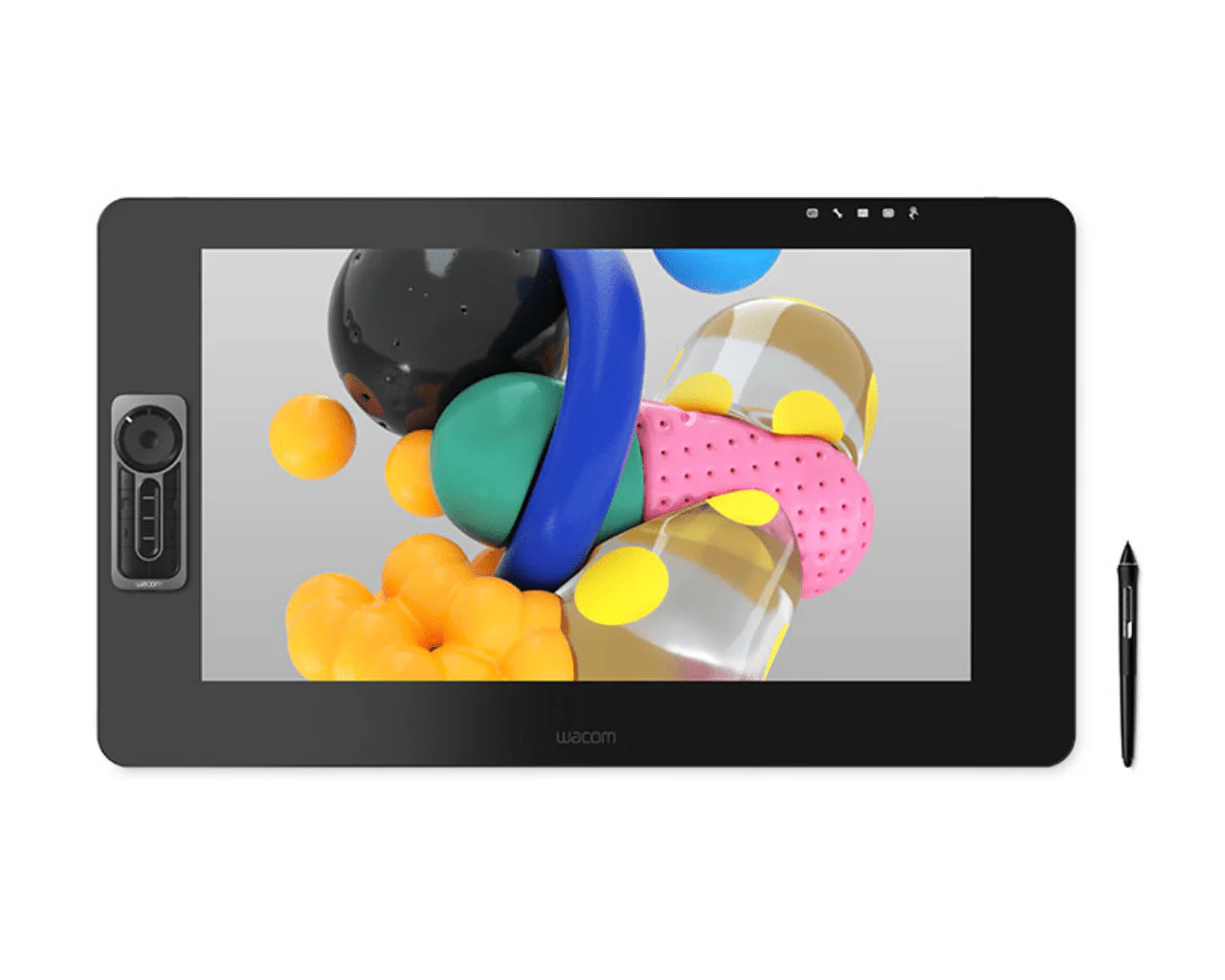
Wacom Cintiq Pro Creative Pen Display 24'' DTK-2420
Wacom Cintiq Pro Creative Pen Display
Create directly on a large canvas with premium color performance
Our largest screens give you more space, more efficiency, and more time.
Wacom Cintiq Pro 24 and 32 give you something priceless: space. So much, in fact, that you won't waste time searching for that reference image or opening and closing different programs on a secondary screen. And there'll be less zooming in and out too. Now you can save time and take control of your creativity, for a more efficient, controlled workspace.
No moving between different screens

No need to keep switching windows

Save time with less zooming in and out
Always see the whole picture
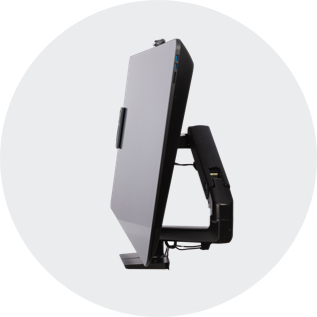
Big moves with a big screen. Tilt it, turn it, and clear it with Wacom Flex Arm*
The beauty of Wacom Cintiq Pro 24 with Flex Arm* is its versatility. Despite being big, it's also surprisingly flexible. Light as a feather, you can tilt it to a better angle, maneuver it closer for a working position that suits you, or pushes it to the side to free space when needed.

Stand up

Sit down
Make room
Ideas jump off the screen
A display that looks, and feels, totally natural
The etched glass screen provides a distinct, tactile experience as you draw, mimicking the feel of a pen on paper. And with minimized parallax, and a screen strong enough to resist ‘pooling’ and rippling, each mark appears precisely where you expect it, every time.
Connect your way
Make it match you
A natural interface
Create in comfort with Wacom Ergo Stand
Customize your Wacom Cintiq Pro
However you like to work, there’s an accessory to make Wacom Cintiq Pro 24 suit you.
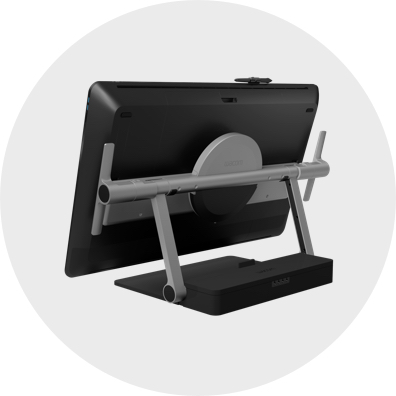
Wacom Ergo Stand
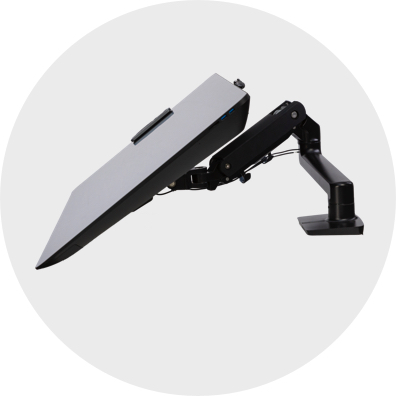
Wacom Flex Arm
Wacom Pro Pen 3D
Taking creativity to another dimension
Designed with 3D creativity in mind, the Wacom Pro Pen 3D provides full navigational control in 3D
Wacom Pro Pen 2 performance included
4x greater pressure sensitivity, exceptional tilt-response, and lag-free tracking provide greater creative control
Control at your fingertips
Three fully customizable pen buttons let you tumble objects, pan, zoom, model, sculpt or modify creative tools in 3D and 2D applications
Ready to Create
Works with Wacom MobileStudio Pro, Wacom Cintiq Pro, Wacom Cintiq, or Wacom Intuos Pro (2017 model) and with any Windows or Mac application
Wacom Drawing Glove
Freedom to create without distraction
Eliminate smudges and reduce friction between screen and hand. The drawing experience never felt so good with the Wacom Drawing Glove. Simply draw with confidence.
Better for drawing, better for the environment
Designed with eco-friendly recycled materials, the Wacom Drawing Glove allows you to draw with the freedom of knowing you are helping the world we live in. Recycled Polyester and Spandex offer breathability, stretch, and durability for a comfortable fit. Feel comfortable drawing anything, and know that you’re contributing to a better environment.
Clearer, cleaner drawing
Use the Wacom Drawing Glove and enjoy a natural drawing experience. Say goodbye to unnecessary smudges, and fingerprints and minimize friction from hand to screen or pen tablet. And with everything clearly visible on screen, nothing comes between you and your creation. Now, you’re free to draw comfortably for hours.
Fits like a glove, works like a dream
Wacom Drawing Glove’s unique fingerless design and seamless edge allow for a natural working experience. Focus on your drawing and access touch functionality on the screen as well as the keyboard. Designed to work perfectly whether you're left or right-handed. Sound good? You’ll find it feels good too.
| Specifications: | |
| Product Type: |
|
| Model Code: |
|
| Product Weight: |
|
| Product Dimensions: |
|
| Product color: |
|
| Stand Adjustability: |
|
| Productivity Boosters: |
|
| Power Input Voltage: |
|
| Power output Voltage: |
|
| Security: |
|
| Certifications: |
|
| Operating Temperature and Humidity: |
|
| Downloadable Software/offers: |
|
ExpressKey™ Remote Dimensions: |
|
ExpressKey™ Remote Continuous Operation: |
|
ExpressKey™ Remote Charge Time: |
|
Battery: |
|
Screen Size (measured diagonally): |
|
Active Area: |
|
Display Technology: |
|
Display Resolution: |
|
Supported Resolution: |
|
Uniformity compensation function: |
|
Pixel Pitch: |
|
Surface: |
|
Brightness: |
|
Displayable Colors (maximum): |
|
Color Gamut Coverage Ratio: |
|
Color Depth: |
|
Aspect ratio: |
|
Viewing angle: |
|
Response Time: |
|
Pen: |
|
Pen Technology: |
|
Pen Pressure Levels: |
|
Pen Resolution: |
|
Pen Type: |
|
Switches: |
|
Replacement Nibs: |
|
System Requirements: |
|
Hardware Requirements: |
|
I/O ports: |
*When connected to the host computer over USB-C (including Cintiq Pro Engine), Cintiq Pro USB 3.0 ports run at USB 2.0 speeds to accommodate 4K video bandwidth over USB-C. |
Audio: |
|
What's In the Box? |
|
Wacom Cintiq Pro Creative Pen Display
Create directly on a large canvas with premium color performance
Our largest screens give you more space, more efficiency, and more time.
Wacom Cintiq Pro 24 and 32 give you something priceless: space. So much, in fact, that you won't waste time searching for that reference image or opening and closing different programs on a secondary screen. And there'll be less zooming in and out too. Now you can save time and take control of your creativity, for a more efficient, controlled workspace.
No moving between different screens
No need to keep switching windows
Save time with less zooming in and out
Always see the whole picture
Big moves with a big screen. Tilt it, turn it, and clear it with Wacom Flex Arm*
The beauty of Wacom Cintiq Pro 24 with Flex Arm* is its versatility. Despite being big, it's also surprisingly flexible. Light as a feather, you can tilt it to a better angle, maneuver it closer for a working position that suits you, or pushes it to the side to free space when needed.
Stand up
Sit down
Make room
Ideas jump off the screen
A display that looks, and feels, totally natural
The etched glass screen provides a distinct, tactile experience as you draw, mimicking the feel of a pen on paper. And with minimized parallax, and a screen strong enough to resist ‘pooling’ and rippling, each mark appears precisely where you expect it, every time.
Connect your way
Make it match you
A natural interface
Create in comfort with Wacom Ergo Stand
Customize your Wacom Cintiq Pro
However you like to work, there’s an accessory to make Wacom Cintiq Pro 24 suit you.
Wacom Ergo Stand
Wacom Flex Arm
Wacom Pro Pen 3D
Taking creativity to another dimension
Designed with 3D creativity in mind, the Wacom Pro Pen 3D provides full navigational control in 3D
Wacom Pro Pen 2 performance included
4x greater pressure sensitivity, exceptional tilt-response, and lag-free tracking provide greater creative control
Control at your fingertips
Three fully customizable pen buttons let you tumble objects, pan, zoom, model, sculpt or modify creative tools in 3D and 2D applications
Ready to Create
Works with Wacom MobileStudio Pro, Wacom Cintiq Pro, Wacom Cintiq, or Wacom Intuos Pro (2017 model) and with any Windows or Mac application
Wacom Drawing Glove
Freedom to create without distraction
Eliminate smudges and reduce friction between screen and hand. The drawing experience never felt so good with the Wacom Drawing Glove. Simply draw with confidence.
Better for drawing, better for the environment
Designed with eco-friendly recycled materials, the Wacom Drawing Glove allows you to draw with the freedom of knowing you are helping the world we live in. Recycled Polyester and Spandex offer breathability, stretch, and durability for a comfortable fit. Feel comfortable drawing anything, and know that you’re contributing to a better environment.
Clearer, cleaner drawing
Use the Wacom Drawing Glove and enjoy a natural drawing experience. Say goodbye to unnecessary smudges, and fingerprints and minimize friction from hand to screen or pen tablet. And with everything clearly visible on screen, nothing comes between you and your creation. Now, you’re free to draw comfortably for hours.
Fits like a glove, works like a dream
Wacom Drawing Glove’s unique fingerless design and seamless edge allow for a natural working experience. Focus on your drawing and access touch functionality on the screen as well as the keyboard. Designed to work perfectly whether you're left or right-handed. Sound good? You’ll find it feels good too.
| Specifications: | |
| Product Type: |
|
| Model Code: |
|
| Product Weight: |
|
| Product Dimensions: |
|
| Product color: |
|
| Stand Adjustability: |
|
| Productivity Boosters: |
|
| Power Input Voltage: |
|
| Power output Voltage: |
|
| Security: |
|
| Certifications: |
|
| Operating Temperature and Humidity: |
|
| Downloadable Software/offers: |
|
ExpressKey™ Remote Dimensions: |
|
ExpressKey™ Remote Continuous Operation: |
|
ExpressKey™ Remote Charge Time: |
|
Battery: |
|
Screen Size (measured diagonally): |
|
Active Area: |
|
Display Technology: |
|
Display Resolution: |
|
Supported Resolution: |
|
Uniformity compensation function: |
|
Pixel Pitch: |
|
Surface: |
|
Brightness: |
|
Displayable Colors (maximum): |
|
Color Gamut Coverage Ratio: |
|
Color Depth: |
|
Aspect ratio: |
|
Viewing angle: |
|
Response Time: |
|
Pen: |
|
Pen Technology: |
|
Pen Pressure Levels: |
|
Pen Resolution: |
|
Pen Type: |
|
Switches: |
|
Replacement Nibs: |
|
System Requirements: |
|
Hardware Requirements: |
|
I/O ports: |
*When connected to the host computer over USB-C (including Cintiq Pro Engine), Cintiq Pro USB 3.0 ports run at USB 2.0 speeds to accommodate 4K video bandwidth over USB-C. |
Audio: |
|
What's In the Box? |
|
Original: $2,248.75
-70%$2,248.75
$674.62Description
Wacom Cintiq Pro Creative Pen Display
Create directly on a large canvas with premium color performance
Our largest screens give you more space, more efficiency, and more time.
Wacom Cintiq Pro 24 and 32 give you something priceless: space. So much, in fact, that you won't waste time searching for that reference image or opening and closing different programs on a secondary screen. And there'll be less zooming in and out too. Now you can save time and take control of your creativity, for a more efficient, controlled workspace.
No moving between different screens
No need to keep switching windows
Save time with less zooming in and out
Always see the whole picture
Big moves with a big screen. Tilt it, turn it, and clear it with Wacom Flex Arm*
The beauty of Wacom Cintiq Pro 24 with Flex Arm* is its versatility. Despite being big, it's also surprisingly flexible. Light as a feather, you can tilt it to a better angle, maneuver it closer for a working position that suits you, or pushes it to the side to free space when needed.
Stand up
Sit down
Make room
Ideas jump off the screen
A display that looks, and feels, totally natural
The etched glass screen provides a distinct, tactile experience as you draw, mimicking the feel of a pen on paper. And with minimized parallax, and a screen strong enough to resist ‘pooling’ and rippling, each mark appears precisely where you expect it, every time.
Connect your way
Make it match you
A natural interface
Create in comfort with Wacom Ergo Stand
Customize your Wacom Cintiq Pro
However you like to work, there’s an accessory to make Wacom Cintiq Pro 24 suit you.
Wacom Ergo Stand
Wacom Flex Arm
Wacom Pro Pen 3D
Taking creativity to another dimension
Designed with 3D creativity in mind, the Wacom Pro Pen 3D provides full navigational control in 3D
Wacom Pro Pen 2 performance included
4x greater pressure sensitivity, exceptional tilt-response, and lag-free tracking provide greater creative control
Control at your fingertips
Three fully customizable pen buttons let you tumble objects, pan, zoom, model, sculpt or modify creative tools in 3D and 2D applications
Ready to Create
Works with Wacom MobileStudio Pro, Wacom Cintiq Pro, Wacom Cintiq, or Wacom Intuos Pro (2017 model) and with any Windows or Mac application
Wacom Drawing Glove
Freedom to create without distraction
Eliminate smudges and reduce friction between screen and hand. The drawing experience never felt so good with the Wacom Drawing Glove. Simply draw with confidence.
Better for drawing, better for the environment
Designed with eco-friendly recycled materials, the Wacom Drawing Glove allows you to draw with the freedom of knowing you are helping the world we live in. Recycled Polyester and Spandex offer breathability, stretch, and durability for a comfortable fit. Feel comfortable drawing anything, and know that you’re contributing to a better environment.
Clearer, cleaner drawing
Use the Wacom Drawing Glove and enjoy a natural drawing experience. Say goodbye to unnecessary smudges, and fingerprints and minimize friction from hand to screen or pen tablet. And with everything clearly visible on screen, nothing comes between you and your creation. Now, you’re free to draw comfortably for hours.
Fits like a glove, works like a dream
Wacom Drawing Glove’s unique fingerless design and seamless edge allow for a natural working experience. Focus on your drawing and access touch functionality on the screen as well as the keyboard. Designed to work perfectly whether you're left or right-handed. Sound good? You’ll find it feels good too.
| Specifications: | |
| Product Type: |
|
| Model Code: |
|
| Product Weight: |
|
| Product Dimensions: |
|
| Product color: |
|
| Stand Adjustability: |
|
| Productivity Boosters: |
|
| Power Input Voltage: |
|
| Power output Voltage: |
|
| Security: |
|
| Certifications: |
|
| Operating Temperature and Humidity: |
|
| Downloadable Software/offers: |
|
ExpressKey™ Remote Dimensions: |
|
ExpressKey™ Remote Continuous Operation: |
|
ExpressKey™ Remote Charge Time: |
|
Battery: |
|
Screen Size (measured diagonally): |
|
Active Area: |
|
Display Technology: |
|
Display Resolution: |
|
Supported Resolution: |
|
Uniformity compensation function: |
|
Pixel Pitch: |
|
Surface: |
|
Brightness: |
|
Displayable Colors (maximum): |
|
Color Gamut Coverage Ratio: |
|
Color Depth: |
|
Aspect ratio: |
|
Viewing angle: |
|
Response Time: |
|
Pen: |
|
Pen Technology: |
|
Pen Pressure Levels: |
|
Pen Resolution: |
|
Pen Type: |
|
Switches: |
|
Replacement Nibs: |
|
System Requirements: |
|
Hardware Requirements: |
|
I/O ports: |
*When connected to the host computer over USB-C (including Cintiq Pro Engine), Cintiq Pro USB 3.0 ports run at USB 2.0 speeds to accommodate 4K video bandwidth over USB-C. |
Audio: |
|
What's In the Box? |
|